G DATA Security Awareness Trainings
Assign a Non-Desk-Worker learning plan
You can assign Non-Desk-Worker learning plans to a single learner or to multiple learners at once.
| If you switch from your own/previous learning plans or the 3-Lvel-System, your learners can switch to the new learning concept after it has been enabled by us. |
Assign the Non-Desk-Worker learning plan to a learner
1 |
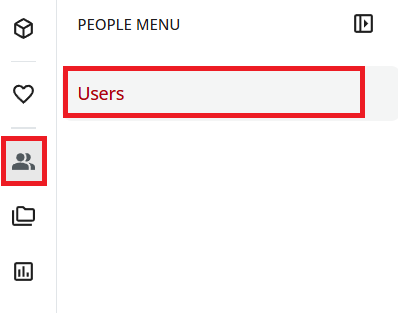
Open user management: In the menu on the left, select the person icon and select Users. |
|
2 |
Search for the user for whom you want to activate the learning journey. |
|
3 |
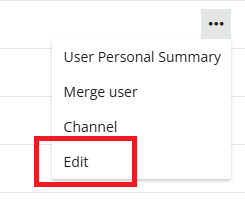
To the right of the name, click the three dots and select Edit. |
|
4 |
Click Additional Fields in the upper-right. |
|
5 |
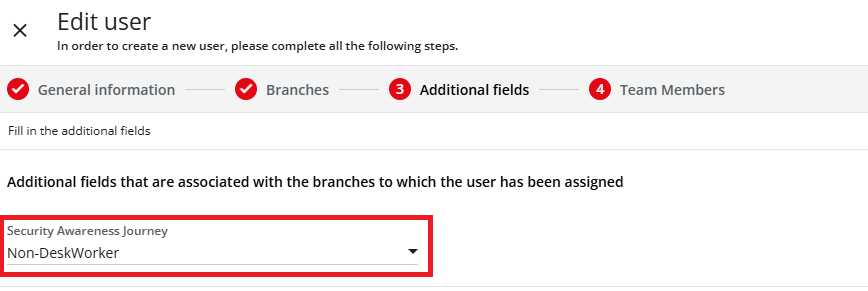
In the dropdown menu in the "Security Awareness Journey" field, select the Non-Deskworker learning plan (for Switzerland: Non-Deskworker-CH). |
|
6 |
Click Update to save the changes. |
|
Assign the Non-Desk-Worker learning plan to multiple learners
1 |
Open user management: In the menu on the left, select the person icon and select Users. |
|
2 |
Select the desired learners for whom you want to activate the learning journey. |
|
3 |
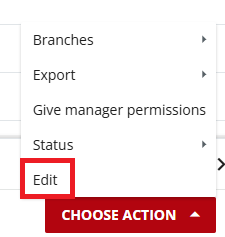
Click Select Action and select Edit. |
|
4 |
Scroll down a bit. |
|
5 |
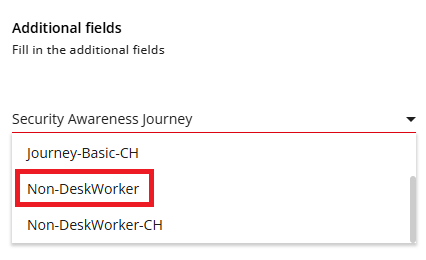
In the dropdown menu in the "Cyber Security Awareness Journey" field, select the Non-Deskworker learning plan (for Switzerland: Non-Deskworker-CH). |
|
6 |
Click Edit Users to save the changes. |
|