G DATA Security Awareness Trainings
Enroll learners in courses
The following instructions explain how to assign learners to a single course.
1 |
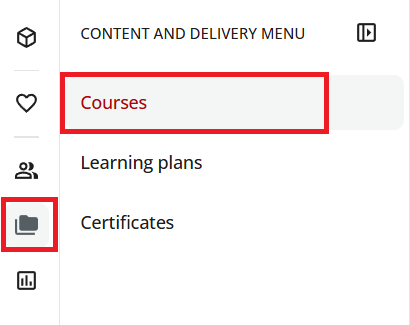
Open the "Courses" section. To do so, open the menu via the folder icon in the upper-left corner and then click Courses. |
|
2 |
From the list, select the course you want to assign by clicking the user icon |
|
3 |
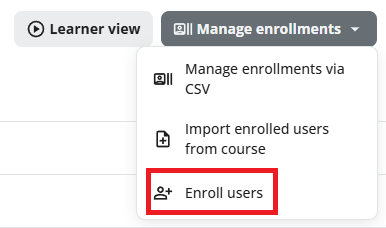
In the upper-right corner, click the Manage Enrollments button and select Enroll Users. |
|
4 |
Select the checkboxes for all users you want to assign to the course. |
|
5 |
Click Next in the lower-right corner. |
|
6 |
In the next window, click Confirm. We recommend not setting any deadlines for completion. |
|
