G DATA Security Awareness Trainings
Assign learners to a learning plan
In a learning plan, courses are grouped together in a predefined order. For your employees—referred to below as users or learners—to be able to complete courses, the users must be assigned to the learning plan (or learning plans) intended for them.
Proceed as follows to assign learning plans to users.
1 |
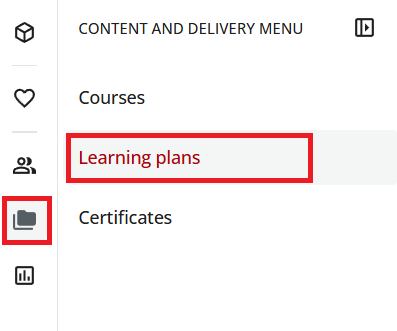
Open the "Learning Plans" section. To do so, use the folder icon at the top left to open the menu, and then select Learning Plans. |
|
||
2 |
Click the learning plan in which you want to enroll a user. |
|||
3 |
To assign a new user, click +Assign/Enroll → +Enroll User in the upper right. A list appears with all your employees. |
|||
4 |
Select the learner you want to assign to the learning plan by selecting the corresponding checkbox. You can use the search bar to find the learner.
|
|||
5 |
Click Confirm. |
|||
The new learner has been assigned to the learning plan. This means the learner has access to the learning plan’s courses in the Learning Management System via the Dashboard or "My Courses and Learning Plans".