G DATA Security Awareness Trainings
Remove a learner’s assignment to a learning plan
If you want to remove an employee from learning plans, e.g., if learning plans were not assigned in the correct language, the assignment to the learning plan must be removed (not for 3-Level-System or Non-Deskworker assignment).
To remove a learner from a learning plan:
1 |
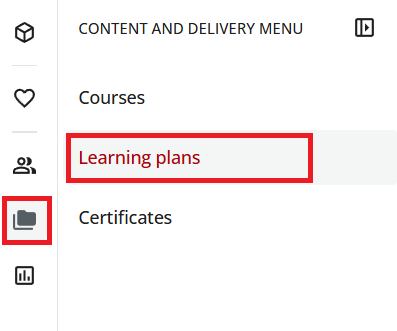
Open the "Learning plans" section. To do so, use the folder icon in the upper left to open the menu and then select Learning plans. |
|
2 |
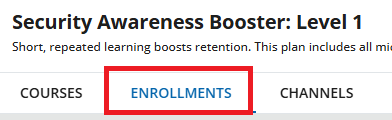
Click the learning plan from which you want to unenroll a user and go to Enrollments. |
|
3 |
Find the learner row that you want to remove from the learning plan and use the three dots to select Unenroll. A dialog window appears asking whether you really want to remove the assignment. |
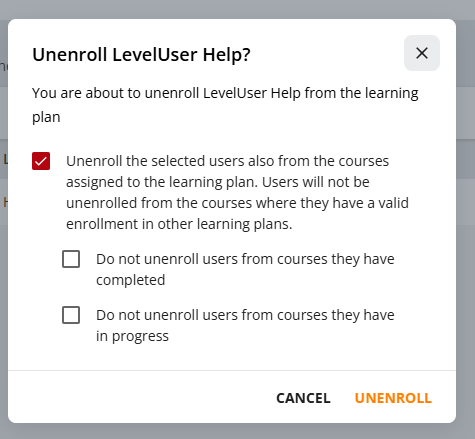
3.a) Enable the first checkbox by selecting it. 3.b) Do not enable the two indented checkboxes "Do not unenroll users from courses they have completed" and "Do not unenroll users from courses in progress"! |
4 |
Confirm with Unenroll. |
|
The courses in the learning plan will no longer be available to your learner on the learner Dashboard.