G DATA 365 | Mail Protection

Customize the email template

It is possible to notify recipients of malware-infected emails that have been moved to quarantine either immediately or as a batched notification at a specific time. You can customize this notification email according to your requirements.

1

In the interface of your G DATA 365 | Mail Protection, select Einstellungen.

2

Select Quarantäne.

3

Edit status email.

Click the button TemplateBearbeiten to open a small text editor that you can use to customize the text of the email as desired.

The existing default text informs the original recipient of the original email about:
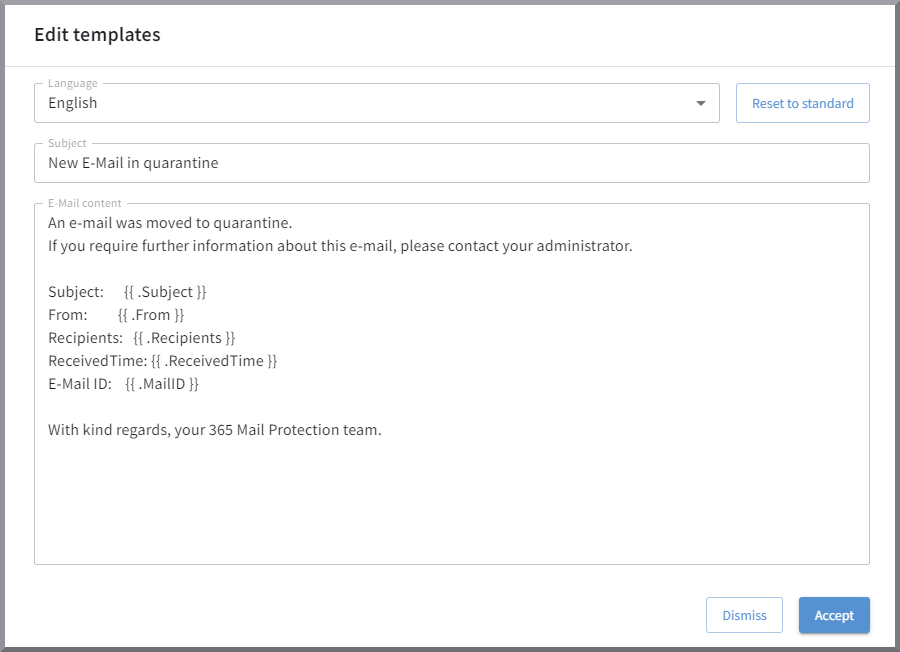
  • The subject of the infected email (Subject).

  • The sender email address of the infected email (From).

  • The recipient email addresses of the infected email (Recipients).

  • The date and time the infected email was received (ReceivedTime).

  • The email ID assigned to this email by G DATA 365 | Mail Protection (MailID).

Use placeholders in your email for the information listed above so that it is automatically inserted into your email. You can see the syntax with the curly braces in the screenshot.

G DATA 365 | Mail Protection Edit template