G DATA MXDR
Automated installation of the G DATA Agent on VDI machines
In some scenarios, it may be necessary to install the G DATA Agent as a "disposable agent" (→ disposable Agent). This applies in particular to machines that are fully prepared and booted as clones from an image, and do not store anything when they are shut down. Well-known examples are Citrix XenDesktop/XenApp and VMWare Horizon Full Clone, Linked Clone or Instant Clone.
| It is important that G DATA Agents that are deployed as clones from an image are still uniquely identifiable! The installation should also not be performed on Golden Images. |
For this reason, it is not sufficient to simply load an image that includes the G DATA Agent when you start the machine. You require a special profile from us for this. We explain how to proceed below.
Distribution process
1 |
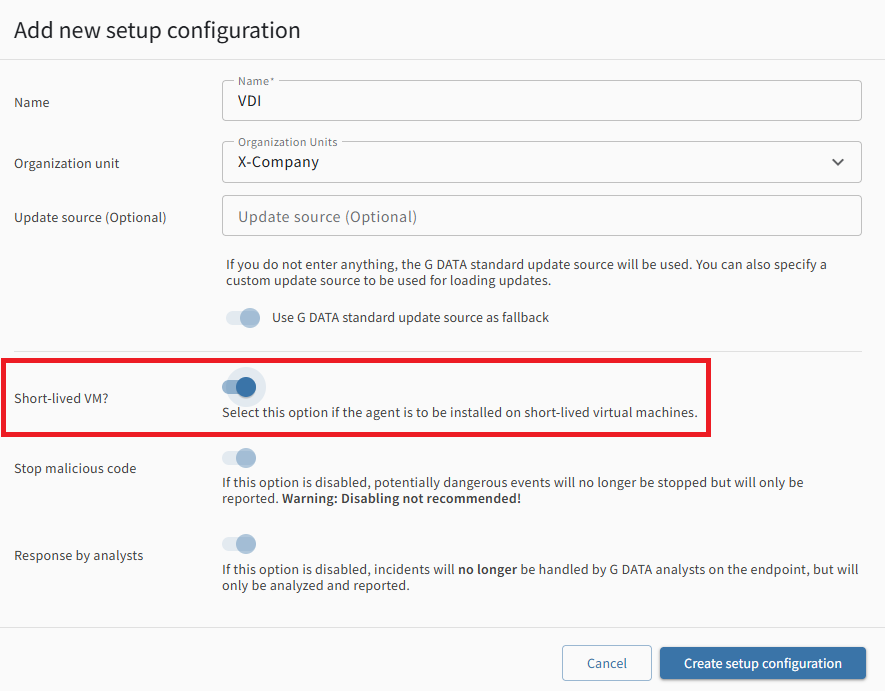
In the view “Installing New Endpoints”, create a new setup configuration. When creating it, select the “Short-lived VM?” option. The corresponding, specific Setup-ID will then contain the configuration profile for the disposable agent. If desired, you can also create a separate organization unit (→ OU) that groups all clones together. |
|
||
2 |
On each startup of the clone, start the Agent setup in silent mode.
|
|||
3 |
This ensures that an G DATA Agent is created when the machine boots, which can be uniquely identified. |
|||