G DATA XDR
View "Install new endpoints"
The "Install new endpoints" view provides additional information specific to installing your G DATA Agents and also provides the option to download the installation software directly.

In the endpoint list (→ 1), all endpoints are listed on which the G DATA Agent is installed.
Setup Name |
Setup Name of the endpoint on which the Agent is installed. |
||
Setup ID |
The Setup ID used to install the G DATA Agent.
|
||
Organization Unit |
Shows the OU under which the endpoint is assigned. |
||
Ephemeral VM |
Indicates whether the respective endpoint is a system that is regularly redeployed. |
||
Update source |
Indicates the source from which updates for the G DATA Agent are applied. "Standard" means updates come from G DATA; if a different source has been set, it is shown here. |
||
Stop malware |
Indicates whether malware can be stopped automatically. |
||
Policy Control |
Indicates whether Policy Control is enabled on the endpoint. |

In the upper-right corner of the table are search and column display (→ 2). With search
 , you can display specific endpoints based
on Setup Name or Setup ID. With the column display
, you can display specific endpoints based
on Setup Name or Setup ID. With the column display
 , you can hide individual table columns
as needed.
, you can hide individual table columns
as needed.
Downloading the installation software (→ 3)
In the "Install new endpoints" view, you can also download the installation software for the G DATA Agent.
|
Important information on using templates. The G DATA Agent must not be installed on system images/templates that are then used for cloning on other systems. The installation of the G DATA Agent must always be performed after a cloning process to ensure unique identification of Incidents. |
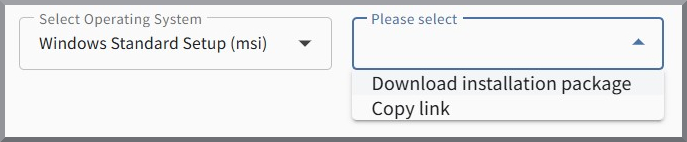
First, select the operating system for which you need the installation software.

Then select whether you want to download the software directly or copy the link to the download page to the clipboard.
You can now install the G DATA Agent on the desired endpoint. You can simply copy the required Setup ID from the endpoint list.