G DATA XDR
How do I create a secure password, and how do I know whether it is secure?
Passwords protect your data. Never handle them carelessly, do not share them, and never write your passwords down where they are visible.
Given today’s cyber threats, using strong passwords is essential in both business and personal environments.
Our G DATA Password Generator allows you to create passwords based on specific criteria. You can also assess existing passwords for strength and the estimated time required to crack them.
Installation
The G DATA Password Generator is a local tool and does not require installation. The program has no additional dependencies and can be used immediately after downloading. No other installed G DATA product is required, so a G DATA product license is not necessary.
Download the G DATA Password Generator from our download page, extract the ZIP file, and run the corresponding executable file (GDATA_Password_Generator.exe).
Usage
Start the application by double-clicking the executable file (GDATA_Password_Generator.exe). The following graphical user interface (GUI) then opens:
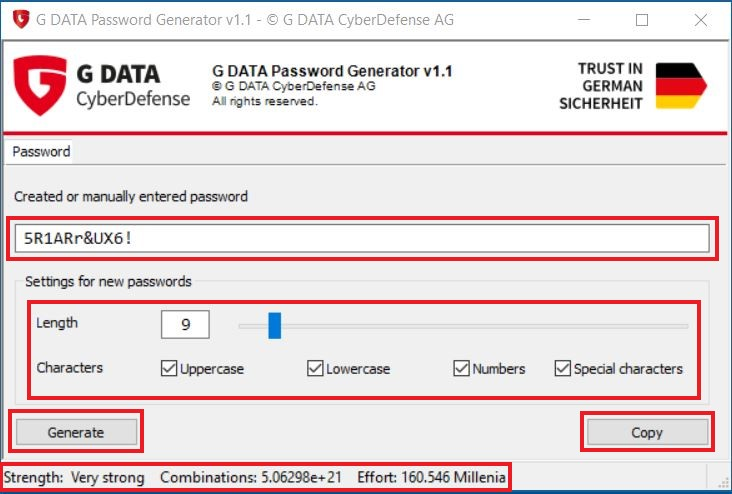
Under "Generated or Manually Entered Password", you initially see the currently generated password and can copy it to the clipboard using the Copy button.
Under "Settings for New Passwords", you can specify which types of characters are used to generate
passwords.
You can select any combination of the options
-
Uppercase letters
-
Lowercase letters
-
Numbers
-
Special characters
and configure the password length. Click Generate to generate a new password based on the selected settings.
At the bottom of the user interface, you will find information about the currently displayed password, such as Password Strength, the number of possible Combinations, and an Estimated Cracking Time indicating how long it would take to crack the password using a brute-force approach.
Password strength can be divided into the following categories:
-
Weak
-
Moderate
-
Strong
-
Very Strong
-
Extremely Strong
| You can enter a password you already use in the password field to view its strength. Try it out! |
| #Passwords generated or tested using this tool are neither transmitted nor stored by G DATA! |
How Is Password Strength Calculated?
The password strength calculation considers both the length of the password and the types of characters used. First, the password is assigned points for its length. The longer the password, the higher the score.
Points Assigned by Length
20 or more characters = 6 points 16-19 characters = 5 points 12-15 characters = 4 points 8-11 characters = 3 points 6-7 characters = 2 points 5 or fewer characters = 1 point
Additional points are added to these maximum 6 points based on the number of occurrences of each character type in the password.
Additional Points for Different Character Types and Their Frequency
Are uppercase letters present? If so:
1 uppercase letter = +1 point 2 uppercase letters = +2 points 3 or more uppercase letters = +3 points
Are lowercase letters present? If so:
1 lowercase letter = +1 point 2 lowercase letters = +2 points 3 or more lowercase letters = +3 points
Are numbers present? If so:
1 number = +1 point 2 numbers = +2 points 3 or more numbers = +3 points
Are special characters present? If so:
1 special character = +1 point 2 special characters = +2 points 3 or more special characters = +3 points
A maximum of 18 points can be assigned, evaluated as follows:
| Score | Password Strength |
|---|---|
16-18 points |
Extremely Strong |
12-17 points |
Very Strong |
8-11 points |
Strong |
6-7 points |
Moderate |
4-5 points |
Weak |
1-3 points |
Very Weak |
How Is the Estimated Time Required to Crack the Password Calculated?
To crack a password, in the worst case, all possible combinations of all characters in the password must be tried until the correct combination is found.
To estimate how long it takes to find the correct combination, the number of possible combinations is calculated. The following calculation assumes that the character types used in the password are known. Each character type has a specific number of possible characters:
| Character Type | Number of Possible Characters |
|---|---|
Uppercase letters |
26 |
Lowercase letters |
26 |
Digits |
10 |
Symbols |
32 |
If a character type is found in the password during the check, the number of possible characters for that type is added to the total.
|
Example: If an uppercase letter is found, 26 is added (for 26 possible letters). If a symbol is then found, 32 (possibilities) are added to the 26, resulting in a value of 58. |
The resulting value is then used in the following formula: Cracking time = (Possible characters to the power of the number of characters) / 1,000,000,000)
|
This value is an estimate. Depending on the computing power available for the brute-force attack, the actual result may differ. |
|
Example: The calculation above yielded 58 possible characters. If the password is 4 characters long, the calculation in our example is: (58 * 58 * 58 * 58) = 11,316,496 / 1,000,000,000 = 0.011316496 This means that cracking our example password using a brute-force approach would take 0.01 seconds. |