G DATA XDR
Latest Information
Here we provide information about new features and important changes.
12.11.2026 |
The current release introduces changes to update distribution for agents.
|
||
20.10.2026 |
Show changesThe current release introduces a new feature in Endpoint management. Custom setup configurations can now be deleted. G DATA Agents installed using a deleted setup configuration are not affected and retain their settings.
|
||
15.10.2026 |
Show changesAll G DATA XDR features (Alerts, Quarantine, Exclusions) now display the full location of the fallback folder used when attempts to move an Artifact back fail. Previously, only %%Fallback%% was displayed in these locations. View screenshot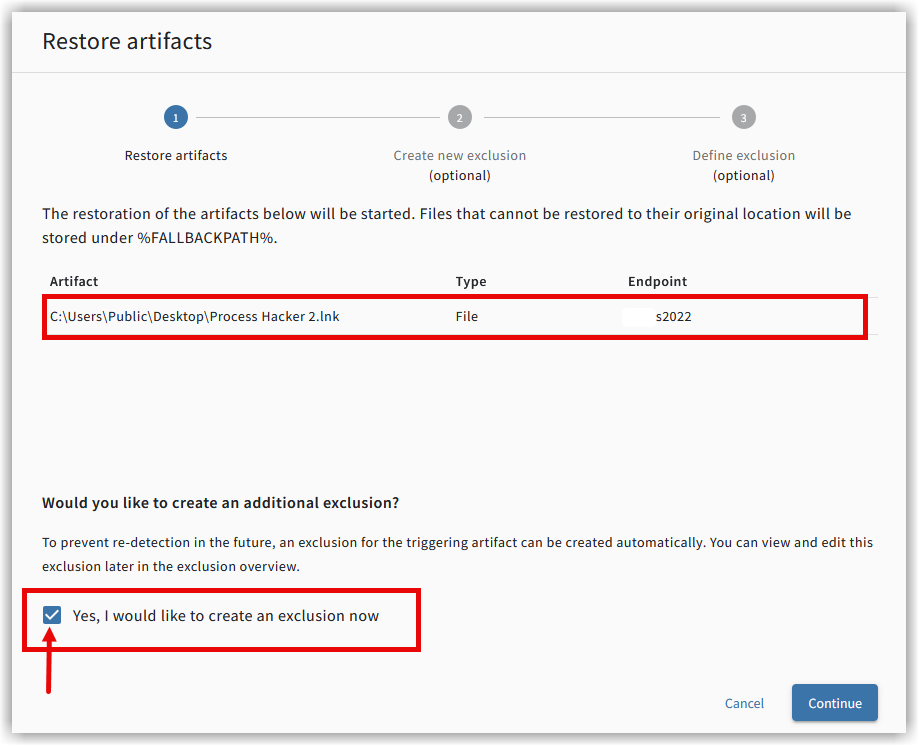
|
||
05.10.2026 |
Show changesYou can now find entries in the Exclusions list more quickly:
|
||
22.09.2026 |
Show changesThe current release introduces new features in Endpoint management:
|
||
08.09.2026 |
Show changesIn addition to internal adjustments, the current update resolves several issues.
|
||
17.08.2026 |
Show changesThe latest update introduced improvements related to Endpoints, as well as performance improvements.
|
||
04.08.2026 |
Show changesEntering Exclusions: Previously, wildcards could be used to allow drive letters or entire paths. With this update, wildcards can now also be applied to portions of a path. Examples: For more information about using wildcards, see the Exclusions chapter. |
||
29.07.2026 |
Show changesThis update significantly revises role management. In addition to predefined roles, you can now assign one role per category to a user, allowing you to better tailor user permissions to your individual requirements. |
||
14.07.2026 |
Show changesWith today’s update, the G DATA Web Portal has been localized into many new languages. In addition to German and English, you can now choose Polish, Spanish, Italian, French, Dutch, and Portuguese. |
||
23.06.2026 |
Show changesToday’s update primarily improves the behavior of setup configurations.
|