The G DATA Backup Extractor
| The G DATA Backup Extractor is only available in german. |
The Backup Extractor does not require installation.
With the G DATA Backup Extractor, you can access or restore backups created by the G DATA Backup Extractor even if the G DATA software itself is not installed on your device. Der G DATA Backup Extraktor kommt ohne eine Installation aus.
Download the G DATA Backup Extraktor at Download
The G DATA Backup Extractor can be used in two different ways.
GDATA_Backup_Extractor.exe starts a command-line version of the G DATA Backup Extractor.
GDATA_Backup_Extractor_GUI.exe starts a graphical user interface for G DATA Backup Extractor.
Both programs offer similar functionality. In the graphical user interface version, you can manually select individual files in addition to applying a filter.
G DATA Backup Extractor Interface Version
Backup Extractor Interface
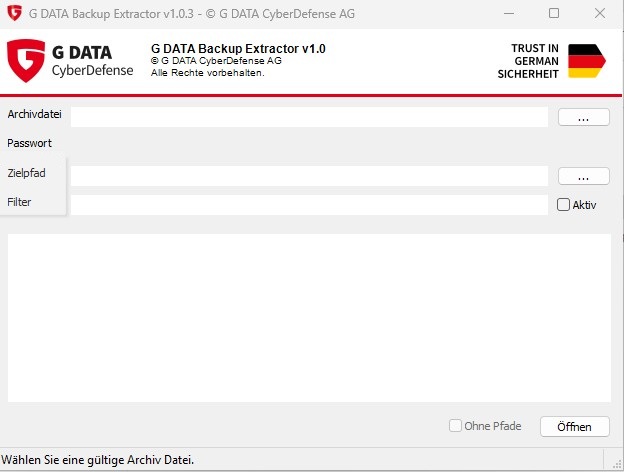
Run GDATA_Backup_Extractor.exe to open the G DATA Backup Extractor interface.
At start the function Archiv Datei auswählen (select archive file) will be executed by default.
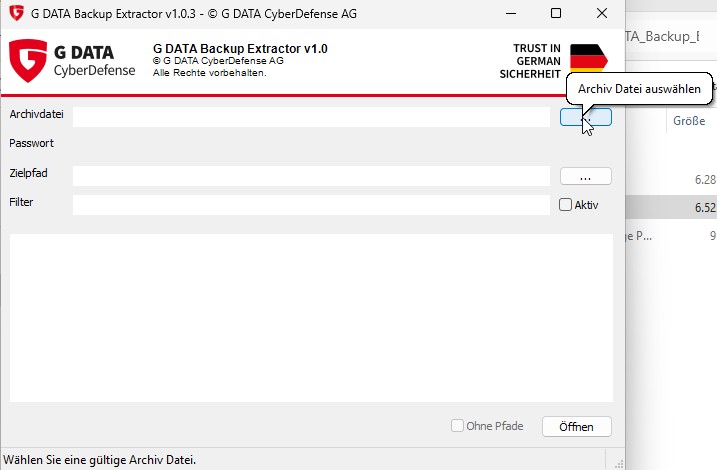
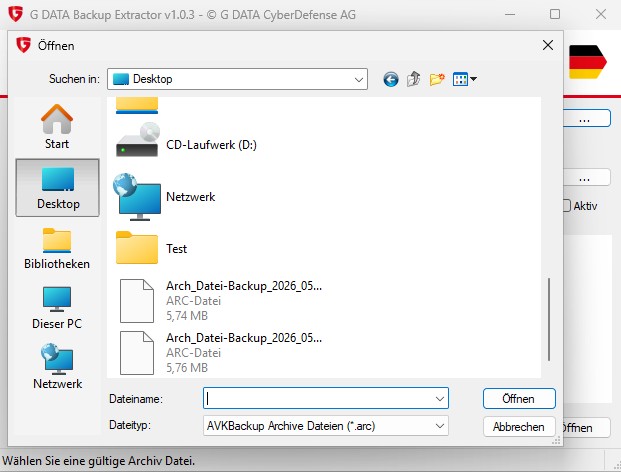
Select the archive you want to extract. Archives created with G DATA are stored as .arc files.
Once an archive has been selected, it can be added by clicking Öffnen (open).
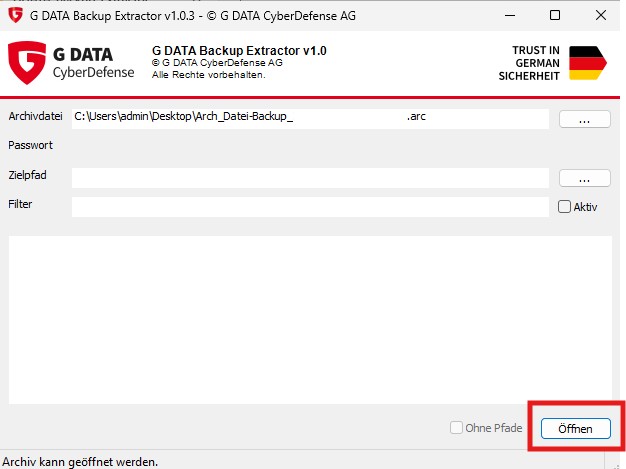
Your backup will now be displayed in the lower section of the window.
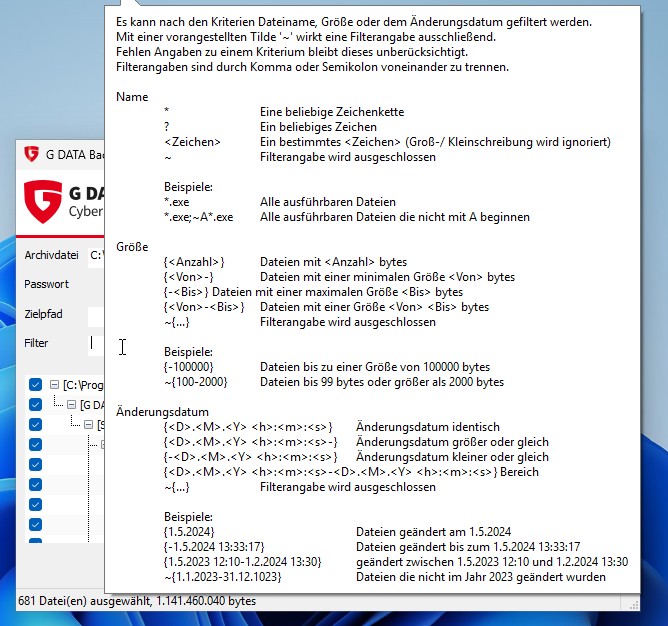
If needed, you can use various filter options when extracting your backup.
You can view the different options by mouseover.
Filter options
Select a destination path and extract your backup to the location of your choice.
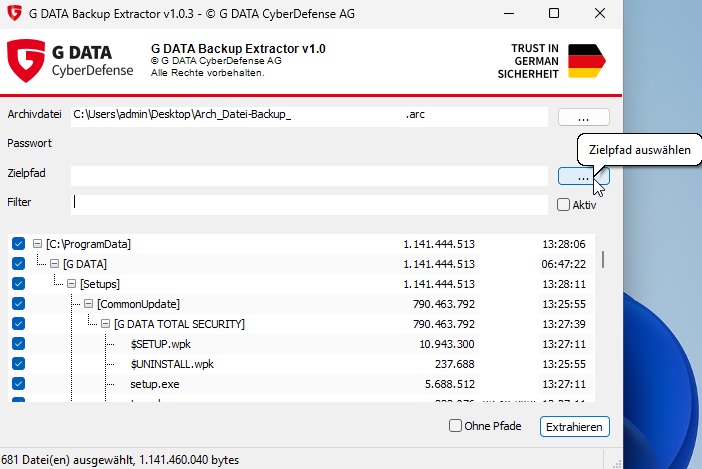
If no destination path has been selected, you will be prompted to choose one when attempting to extract the backup.
G DATA Backup Extractor Command-line Version
With G DATA Backup Extractor, you can extract and overwrite system files or protected files. Therefore, administrator privileges are required to run the program. To do this, start the program from a Windows command prompt with administrator rights.
Use quotation marks for command-line arguments that contain spaces or special characters.
If the program is started without any arguments, a brief help message will be displayed:
>GDATA_Backup_ExtractorHelp
<Archive>

Archive file, or any archive file from the set (in the case of split archives).

<Commands>

l           Display the list of files
x           Extract files (with the original file paths)
e           Extract files (without the original file paths)

<Options>

-p          <Password> Password for the archive
-f          <Filter> Filter criteria
-o          <Destination path> Output directory (extracting files)
-t          Tree View (list of files)
-s          Display file size (list of files)
-d          Display the modification date (list of files)

<Filter>

Files can be filtered by file name, size, or modification date.
Prefixing a filter criterion with a tilde (~) makes it an exclusion filter.
If no value is specified for a criterion, that criterion is ignored.
Multiple filter criteria must be separated by a comma (,) or semicolon (;).

Name

*               An arbitrary character string
?               An arbitrary character
<Character>     A specific <character> (case-insensitive)
~               Filter criterion is excluded

examples:

*.exe           All executable files
*.exe;~A*.exe   All executable files not beginning with an A

Size

{<Bytesize>}    Files containing a specific <bytesize>
{<from>-}       Files with the minimal Bytesize <from> a specific bytesize
{-<To>}         Files with a size up <to> a bytesize
{<From>-<To>}   Files <from> <to> a bytesize
~{...}          Filter criterion is excluded

Examples:

{-100000}       Files up to a size of 100000 bytes
~{100-2000}     Files up to 99 bytes or bigger than 2000 bytes

Modification Date

{<D>.<M>.<Y> <h>:<m>:<s>}                                   Modification Date identical
{<D>.<M>.<Y> <h>:<m>:<s>-}                                  Modification Date later or identical
{-<D>.<M>.<Y> <h>:<m>:<s>}                                  Modification Date earlier or identical
{<D>.<M>.<Y> <h>:<m>:<s>-<D>.<M>.<Y> <h>:<m>:<s>}           Modification Date in a given range
~{...}                                                      Filter criterion is excluded

Examples:

{1.5.2024}                          Files modified 1.5.2024
{-1.5.2024 13:33:17}                Files modified up to 1.5.2024 13:33:17
{1.5.2023 12:10-1.2.2024 13:30}     Files modified from 1.5.2023 12:10 to 1.2.2024 13:30
~{1.1.2023-31.12.1023}              Files not modified in the year 2023
List the contents of an archive (command 'I')
The command 'I' lists the contents of an archive.
>GDATA_Backup_Extractor l c:\Tmp\Arch_Datei-Backup.arc -p Passwortcommand 'I'
G DATA Backup Extractor v1.0.x - © G DATA CyberDefense AG
Archiv: c:\Tmp\Arch_Datei-Backup.arc
Passwort: ********

C:\Program Files (x86)\G DATA\TotalSecurity\ASK\ask.dll
C:\Program Files (x86)\G DATA\TotalSecurity\ASK\ask.en.dll
C:\Program Files (x86)\G DATA\TotalSecurity\ASK\ASK.exe
C:\Program Files (x86)\G DATA\TotalSecurity\ASK\GDASpam.dll
C:\Program Files (x86)\G DATA\TotalSecurity\ASK\GDASpamx64.dll
C:\Program Files (x86)\G DATA\TotalSecurity\ASK\GDcf.dll
C:\Program Files (x86)\G DATA\TotalSecurity\ASK\GDcfx64.dll
C:\Program Files (x86)\G DATA\TotalSecurity\AVK\AVK.dll
C:\Program Files (x86)\G DATA\TotalSecurity\AVK\AVK.en.dll
C:\Program Files (x86)\G DATA\TotalSecurity\AVK\AVK.exe
C:\Program Files (x86)\G DATA\TotalSecurity\AVK\avkcmd.exe
...
Password protected Archive (option -p <Password>)
If the archive is password-protected and no password was provided when starting extracting process, you will be prompted to enter one before the archive is opened.
>GDATA_Backup_Extractor l Arch_Datei-Backup.arc
G DATA Backup Extractor v1.0.x - © G DATA CyberDefense AG

Archiv: Arch_Datei-Backup.arc
Passwort:
For security reasons, the password is not displayed in the console while you are typing it. The input is entered 'blind'. After confirming with the Enter key, the password will be displayed as a series of asterisks
>GDATA_Backup_Extractor l Arch_Datei-Backup.arc
G DATA Backup Extractor v1.0.x - © G DATA CyberDefense AG

Archiv: Arch_Datei-Backup.arc
Passwort: ********
If an incorrect password is entered, the password prompt will be repeated up to three times before the operation is aborted.
Optionally, the password can also be provided directly as a command-line parameter.
Filter (option -f <Filter>)
Files can be filtered by file name, size, or modification date. If no value is specified for a criterion, that criterion is ignored. Prefixing a filter criterion with a tilde (~) makes it an exclusion filter. Multiple filter criteria must be separated by a semicolon (;).
Filter criteria within the same category broaden the selection, while filter criteria across different categories narrow the selection.
Example
Display all exe and dll files that do not begin with "GD", were modified on 5.10.2023, and have a size of at least 3000000 characters.
>GDATA_Backup_Extractor l c:\Tmp\Arch_Datei-Backup.arc -p Password -f "*.exe;*.
G DATA Backup Extractor v1.0.x - © G DATA CyberDefense AG

Archiv: c:\Tmp\Arch_Datei-Backup.arc
Passwort: ********
Filter: .*\.exe;.*\.dll;~GD.*\..*;{3000000-18446744073709551615};{5.10.2023 0:00:00-5.10.2023

C:\Program Files (x86)\G DATA\TotalSecurity\AVK\AVK.dll                     6.425.616
C:\Program Files (x86)\G DATA\TotalSecurity\AVK\AVKWCtlx64.exe              3.861.552
C:\Program Files (x86)\G DATA\TotalSecurity\AVK\BootCDWizard.exe            4.249.656
C:\Program Files (x86)\G DATA\TotalSecurity\AVKTray\AVKTray.exe             3.882.024
C:\Program Files (x86)\G DATA\TotalSecurity\AVKTuner\AVKTuner.dll           3.146.280
C:\Program Files (x86)\G DATA\TotalSecurity\AVKTuner\AVKTunerService.exe    4.420.168
C:\Program Files (x86)\G DATA\TotalSecurity\Shredder\Reisswlf64.dll         5.598.256
Name
The name filter can be used to search for specific file names (or parts of file names). If the file name you are searching for contains spaces, it must be enclosed in quotation marks. File name searches are case-insensitive: "abc.txt" is considered the same file as "ABC.TXT".
In addition to numbers, letters, and special characters, the search term may contain the following modifiers:
*                       Any sequence of characters
?                       Any single character
~                       Filter criterion is excluded
Examples
*.exe                   All executable files
*.exe;~GD.*             All executable files not beginning with GD
~A*.dll                 Dlls excluded beginning witha an 'A'
Size
For better readability, file sizes are displayed with periods as thousands separators (e.g., 1.000.000). However, do not use thousands separators in filter criteria. To distinguish file sizes from other values, they must be enclosed in curly braces.
In addition to specifying an exact size, you can use the minus sign '-' to define a minimum, maximum, or range of file sizes.
The general exclusion operator, the tilde '~', is placed before the opening curly brace.
{<Amount>}                  Files containing <Amount> bytes
{<From>-}                   Files with a minimum size of <From> bytes
{-<Till>}                   Files with a maximum size of <Till> bytes
{<Von>-<Bis>}               Files with a size <From> <Till> bytes
~{...}                      Filter criterion is excluded
Examples
{-100000}                   Files up to a size of 100000 bytes
~{100-2000}                 Files up to 99 bytes or larger than 2000 bytes
Modification Date
In addition to the date, you can also filter by time. Besides specifying an exact point in time, the minus sign '-' can be used to define time ranges.
{<D>.<M>.<Y> <h>:<m>:<s>}                                           Modification date equal
{<D>.<M>.<Y> <h>:<m>:<s>-}                                          Modification date greater or equal
{-<D>.<M>.<Y> <h>:<m>:<s>}                                          Modification date smaller or equal
{<D>.<M>.<Y> <h>:<m>:<s>-<D>.<M>.<Y> <h>:<m>:<s>}                   Modification date in range
~{...}                                                              Filter criterion is excluded
Examples
{1.5.2024}                                                       Files modified on 1.5.2024
{-1.5.2024 13:33:17}                                             Files modified up to 1.5.2024 13:33:17
{1.5.2023 12:10-1.2.2024 13:30}                                  Files modified between 1.5.2023 12:10 and 1.2.2024 13:30
~{1.1.2023-31.12.1023} Files not modified in year 2023| Placeholder | Name | Range |
|---|---|---|
<D> |
Day |
1-31 |
<M> |
Month |
1-12 |
<Y> |
Year |
1900-3000 |
<h> |
Hour |
0-23 |
<m> |
Minute |
0-59 |
<s> |
Second |
0-59 |
Missing information is automatically completed based on the current date and time.
In the following table, the current date and time are assumed to be March 6, 2024, 10:45:17 AM.
| Filter criteria | From (inclusive) | Till (inclusive) |
|---|---|---|
<D> |
<D>.3.2024 0:00:00 |
<D>.3.2024 0:00:00 |
<D>.<M>. |
<D>.<M>.2024 0:00:00 |
<D>.<M>.2024 23:59:59 |
<D>.<M>.<Y> |
<D>.<M>.<Y> 0:00:00 |
<D>.<M>.<Y> 23:59:59 |
<D>.<M>.<Y> <h>: |
<D>.<M>.<Y> <h>:00:00 |
<D>.<M>.<Y> <h>:59:59 |
<D>.<M>.<Y> <h>:<m> |
<D>.<M>.<Y> <h>:<m>:00 |
<D>.<M>.<Y> <h>:<m>:59 |
<D>.<M>.<Y> <h>:<m>:<s> |
<D>.<M>.<Y> <h>:<m>:<s> |
<D>.<M>.<Y> <h>:<m>:<s> |
<h>: |
6.3.2024 <h>:00:00 |
6.3.2024 <h>:59:59 |
<h>:<m> |
6.3.2024 <h>:<m>:00 |
6.3.2024 <h>:<m>:59 |
<h>:<m>:<s> |
6.3.2024 <h>:<m>:<s> |
6.3.2024 <h>:<m>:<s> |
Treeview (Option -t)
The file list can be displayed in a tree view (Tree). Directories are enclosed in square brackets and, like files, are displayed with the appropriate indentation to reflect the directory structure.
>GDATA_Backup_Extractor l c:\Tmp\Arch_Datei-Backup.arc -p Passwort -t

G DATA Backup Extractor v1.0.x - © G DATA CyberDefense AG

Archiv: c:\Tmp\Arch_Datei-Backup.arc
Passwort: ********

    [C:\Program Files (x86)]
        [G DATA]
            [TotalSecurity]
                [ASK]
                    ask.dll
                    ask.en.dll
                    ASK.exe
                    GDASpam.dll
                    GDASpamx64.dll
                    GDcf.dll
                    GDcfx64.dll
                [AVK]
                    AVK.dll
                    AVK.en.dll
                    AVK.exe
...
Display modification date (option -d)
The file’s modification date is displayed right-aligned in either the standard view or the tree view (-t), using thousands separators. It can be combined with the file size display '-s'.
>GDATA_Backup_Extractor l c:\Tmp\Arch_Datei-Backup.arc -p Passwort -t -d

G DATA Backup Extractor v1.0.x - © G DATA CyberDefense AG

Archiv: c:\Tmp\Arch_Datei-Backup.arc
Passwort: ********

    [C:\Program Files (x86)]
        [G DATA]
            [TotalSecurity]
                [ASK]
                    ask.dll
                    ask.en.dll
                    ASK.exe
                    GDASpam.dll
                    GDASpamx64.dll
                    GDcf.dll
                    GDcfx64.dll
                [AVK]
                    AVK.dll
                    AVK.en.dll
                    AVK.exe
...
Extract files while preserving the original directory structure. (command 'x')
Using the 'x' command, files contained in an archive are extracted while preserving their original file paths. The original directory structure is recreated within the specified destination directory.
In addition to the options available for the 'l' command, the destination directory can be specified using the -o option.
Extract files without preserving the original directory structure. (command 'e')
Using the 'e' command, files contained in an archive are extracted without preserving their original file paths. All files are written directly to the specified destination directory.
In the event of filename collisions, the file names are automatically modified to prevent existing files from being overwritten.
In addition to the options available for the 'l' command, you can specify the destination directory using the -o option.